

Start with your words or your artwork
For a business name, phone number, truck name or short statement, start with text. Try your wording in the font styles available for the selected product. Your size and finish determine which lettering choices can be made.
For a logo, illustration or design you already created, upload a PNG or JPG through the full-colour door product. Choose one door or a matching pair, then the size and printed finish. Your original image stays with the order for review before production.
Cut vinyl or a printed graphic?
- Solid-colour cut vinyl follows the shapes of the lettering or suitable artwork. It works well for bold words, numbers and clear silhouettes.
- Reflective cut vinyl is a separate option where the product offers it. Choose the listed reflective finish so the order records the material you want.
- Full-colour print-cut can retain colours, photographs and shading that a single vinyl colour cannot. Choose this option where it is listed on the product.
A photograph, textured image or fine-detail logo needs review at its finished size. The prepared proof shows the proposed result before custom production. For solid cut-vinyl words, use the text builder and choose the lettering style you want.
Uploading a design from an AI tool or designer
- Send the best file you have. Online artwork orders accept PNG or JPG files up to 25 MB. Export the original design at its best resolution.
- Choose the finished size. Select a full-colour door package and its finished size. Resolution is reviewed at that size; a phone preview alone cannot confirm print quality.
- Tell us what belongs in the decal. If the image includes a background, truck mockup or extra wording you do not want reproduced, add that note.
- Check the prepared proof. Review the wording, artwork edges, colour, orientation and complete dimensions. Use artwork you have permission to reproduce.
A mockup of a decal on a truck is a design reference. The artwork and finished dimensions still need to be prepared for the actual product. Upload the original logo or design as well when you have it.
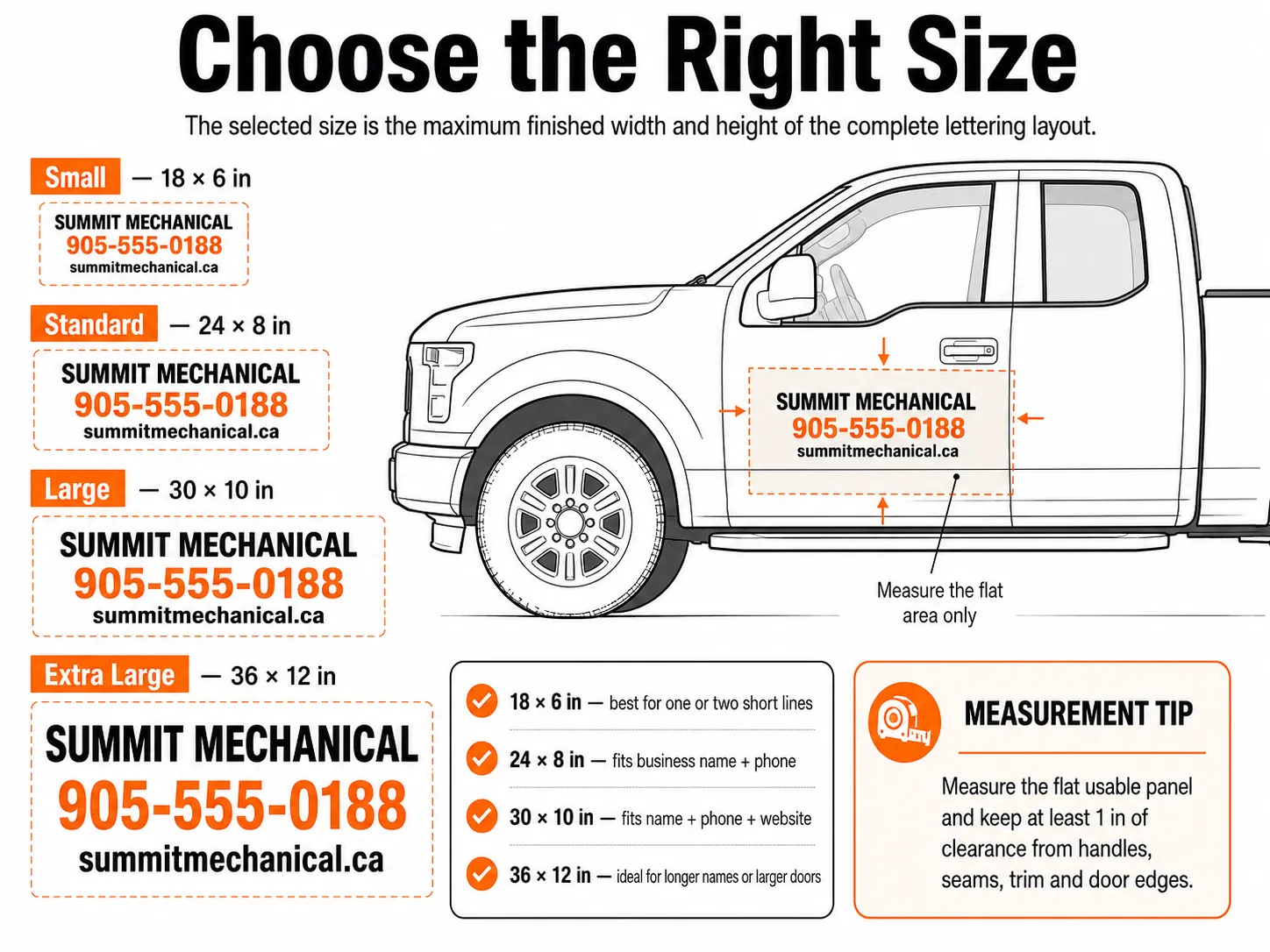
Measure the whole design, not one letter
The finished size is the full rectangle around every line, logo and gap. Measure the clean, usable area inside handles, badges, cameras, trim, seams and panel edges. Choose a package that fits within that area and include any obstruction notes.
A vehicle year, make and model helps describe the truck; your measurements describe the space available. The production proof confirms the proposed size and placement from the details you supply. Read the chosen product for its surface limits and included pieces.
Know what you are ordering
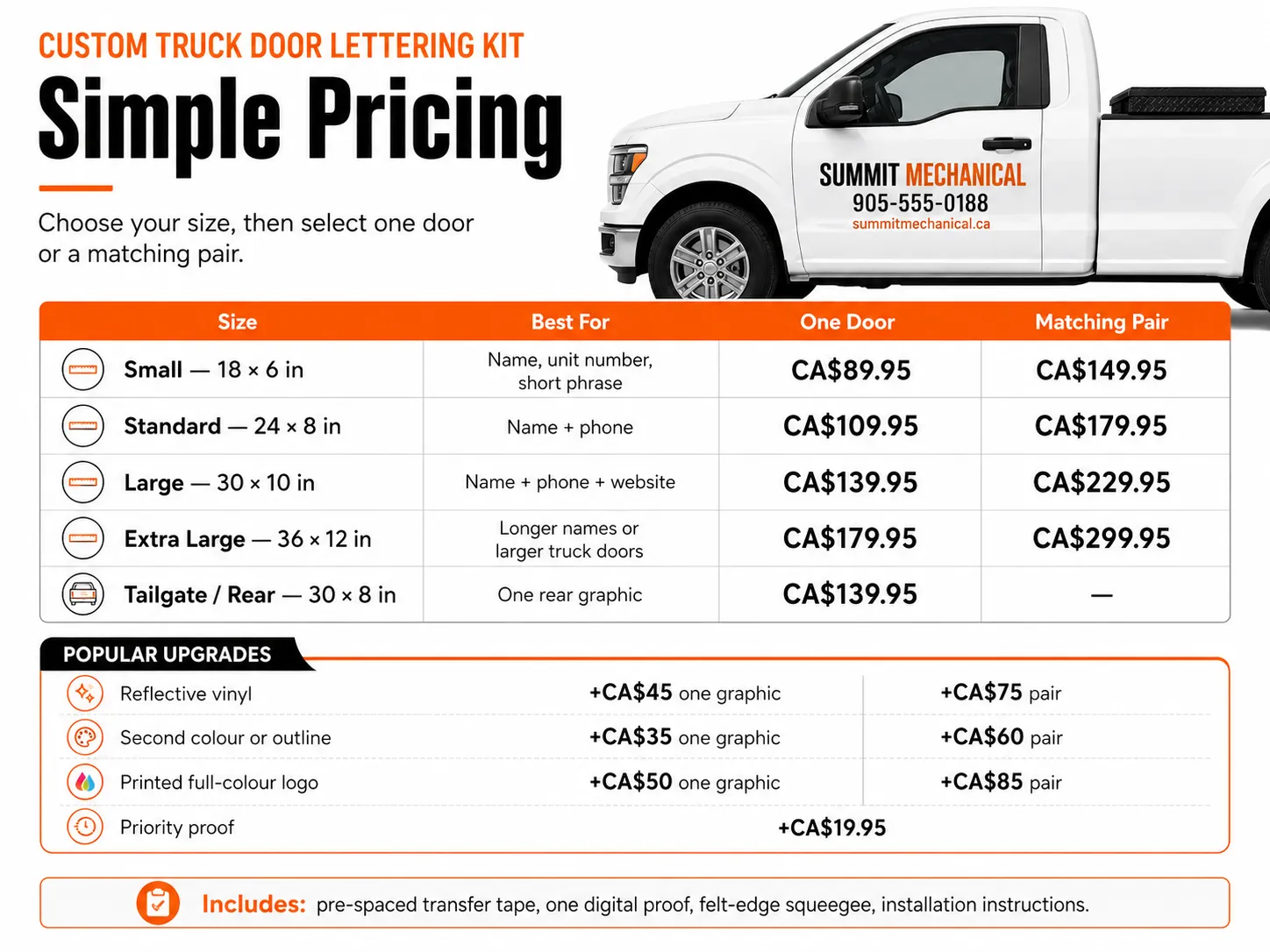
- Size and count: check whether the selected package contains one graphic, a matching pair or a larger set.
- Finish: choose the actual cut-vinyl, reflective or printed option shown on that product.
- Price: use the current package price and quantity shown in the order. Delivery charges appear at checkout.
- Proof: the live preview helps you choose. The final production proof controls the approved wording, artwork and dimensions.
- Installation: follow the preparation and application guidance supplied for the selected material and surface.
Production begins after the required proof approval and usable order details are complete. See Shipping & Returns for the current production and delivery information.
Choose a product for the job
Put a name and number on the doors, add a message to the tailgate, or build a rear-window graphic. For removable business branding, see the magnetic sign pair. Each page shows its own sizes and required details.
For required identifiers and regulation-specific markings, visit ComplianceLettering.ca. For packaging, bottles, laptops and other general sticker jobs, visit StickerCanada.ca.
Your truck. Your name on it.
Bring a PNG or JPG for your doors, or start with a few words.